



Your resume did the work. We just kept it that way.
Uploaded once. Retrieved for each question. Your projects, your stack, your experience.
Source / Your resume EnterviewGo
Not a knowledge problem.
A problem of getting it out in time.
 “I knew this last week.”“Sorry, can you repeat the question?”“…yeah, so, um.”
System audio only. Your microphone is not the input. It's not a toggle you switch off. It's not asking you to trust us. It's audio that was never captured.
The interviewer's question is transcribed, the turn boundary is detected, and only a real question becomes a prompt. Follow a question through the whole pipeline.
The moment they stop talking, the answer is already there.
Not searched for.
Not assembled.
Already on the screen.
Small talk. Agreement. Logistics.
They pass through the conversation.
They don’t become prompts.
Uploaded once. Retrieved for each question. Your projects, your stack, your experience.
Source / Your resumeNo inflated claims. No made-up skills.
If it's not in your resume, it won't appear in your answer.
Short, natural phrasing. Key terms marked. Words you can find at a glance and actually say out loud.
Output / Ready to sayEnterviewGoFrom setup to live.
macOS & Windows.
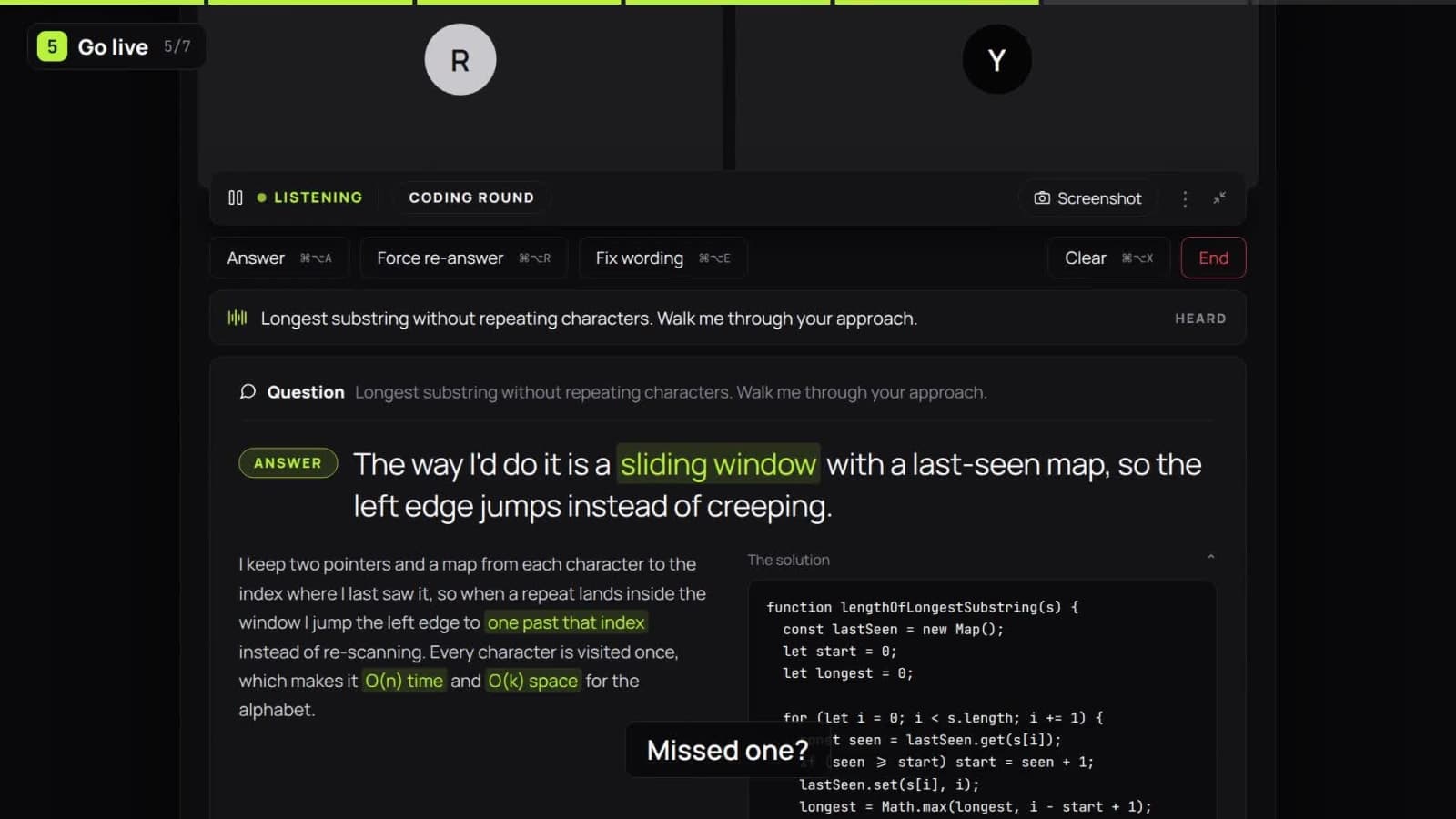 EnterviewGo walkthrough
An AI interview copilot is a desktop app that listens to a live interview through your computer's system audio, detects each question the interviewer asks, and displays a suggested response in a window excluded from screen capture.
EnterviewGo grounds every response in your uploaded resume, so it only references the work, skills and experience you actually have.
It runs on macOS and Windows alongside Zoom, Google Meet and Microsoft Teams, and stays on screen while you work in an editor or on a coding platform such as LeetCode or HackerRank. Behavioural questions, technical deep-dives, system design and phone screens all arrive the same way: as a question, answered from your own history. See how the AI interview assistant works.
What it heard stays visible. Correct it when you need to.
Find the key term at a glance. Keep your focus on the conversation.
Force an answer. Ask again. Fix the wording.
A separate window with OS-level capture exclusion. Verified across Zoom, Google Meet and Microsoft Teams on macOS and Windows.
async function updateProject(projectId) {
  await database.update(projectId);
  await redis.del(`project:${projectId}`);
}Illustrative comparison, not a verification recording. Verified across Zoom, Google Meet and Microsoft Teams on macOS and Windows in September 2026, for live screen sharing. Meeting recordings, screenshot tools and third-party recorders were not part of that testing. Capture and recording behavior can vary by app version, so always confirm on your own setup.
Missed a question? Force an answer.
Misheard a word? Edit and resend.
Wrong direction? Regenerate or dismiss.
Interactive example. The F key works while this section is in view. It is not a claimed product shortcut.
Walk me through a bug that took you the longest to fix.
Honestly, it was a caching bug that took me almost a week. We were using Redis for the repeated reads, but writes to Postgres weren't invalidating the cache properly, so users saw stale data. Turned out it was a timing issue, not the cache logic itself.
Example answer ready.
Every session, saved as a conversation you can come back to.
Just over ₹3 a minute, if you want to think of it that way.
We'd rather you relax and use the whole hour.One payment, not a monthly plan. Comparable AI interview assistants bill $25–$49 every month whether you interview or not.
₹199
one hour · one-time access
Per-minute usage tracking, pass duration, tax treatment and refund terms are published inside the app before any payment.
No invisible-everywhere promises.
No guaranteed outcomes.
An AI interview copilot is a desktop app that listens to a live interview through your computer's system audio, detects each question the interviewer asks, and shows a suggested answer in a window that is excluded from screen capture. EnterviewGo draws every answer from your uploaded resume, so it can only reference work you actually did.
The overlay uses OS-level capture exclusion. Verified across Zoom, Google Meet and Microsoft Teams on macOS and Windows in September 2026, for live screen sharing. Meeting recordings, screenshot tools and third-party recorders were not part of that testing. Test your exact setup before an interview.
Only the system audio path is used as input. Your microphone is not an input to the copilot. It listens to the interviewer coming through your computer.
The overlay stays on screen while you work in an editor or on a coding platform such as LeetCode or HackerRank, and it can suggest an approach alongside a spoken answer. It is not a solver: you write the code and you explain the reasoning.
Edit the question and resend it. You can correct a name, a technical term, or the whole question before asking for another answer.
Force an answer with a key. You can also regenerate or dismiss a suggestion. You stay responsible for what you choose to say.
You upload it once, and relevant material is retrieved for each question. We have not yet published where it is stored, how long it is kept, or which model providers process it, so read the privacy scope before uploading anything personal.
EnterviewGo is a desktop app for macOS and Windows, and capture exclusion is verified on both. That testing covered live screen sharing in Zoom, Google Meet and Microsoft Teams in September 2026. Capture behaviour can change with an app update, so confirm on your own setup.
Access is ₹199 one time, with no subscription. That covers one hour of interview time, billed per minute, and the credits do not expire. Comparable AI interview assistants are priced as monthly subscriptions.
It depends on the interview rules. Ask the interviewer or recruiter whether real-time AI assistance is permitted, and disclose it when required. Do not use it in an interview that prohibits outside assistance. A private overlay does not change those rules.
₹199 · One hour · No subscription
Sounds like you on your best day.